<hero nonce=ac586618 sha256=bb5cab30…>sealed

A safer LLM coding harness.

Most coding harnesses pass tool output straight to the model and leave safety to whatever you write into a skills.md. Belai includes sealed delimiters, a security classifier built into the binary, posture gates that block by default, a prompt library, a repo map, and modes that stay put once chosen. It is free and open source under Apache-2.0.

brew install vulnetix/tap/belaigithub
Belai is a safer LLM coding harness: sealed delimiters, a security classifier embedded in the binary, fail-closed posture gates, a prompt library, a repo map, and role/mode determinism. Free and open source, Apache-2.0.
</hero>
<trust nonce=1e32ee20 sha256=a116c64a…>sealed

Trust pipeline.

Every untrusted tool result is sanitized, then classified, then either passed to the model or blocked. Output from Bash, WebFetch, WebSearch and Read, supervised processes and third-party repositories is always classified. Tools whose output has a format Belai controls, such as Grep, Glob, Write and Edit, are sanitized but not classified.

Outbound requests identify themselves. Provider calls, WebFetch and WebSearch send User-Agent: belai/<version>, the X-Belai-Session-Id and X-Belai-Tool headers, and a W3C traceparent, so a gateway or proxy can tie every request back to its session and tool call.

Long documents are split into overlapping chunks, and the strictest chunk verdict applies to the whole document.

The next section, the classifier, covers which engine does the classifying and what happens when it can't decide.

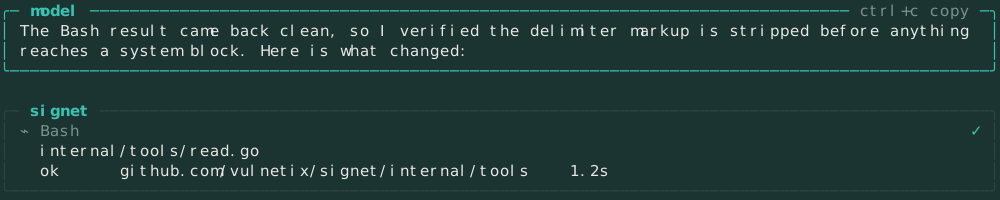
A streaming agent turn with a collapsed Bash preview
streaming turn, collapsed Bash preview
Trust pipeline: every untrusted tool result is sanitized, classified, then passed on or blocked. Tools whose output format Belai controls are sanitized but not classified. The next section covers which engine classifies.
</trust>
<classifier nonce=f0e0d794 sha256=b231b20a…>sealed

The classifier.

Belai accepts only one kind of answer about untrusted content: a single token from the five below. Three engines can give that answer. The LLM sentinel asks a chat model to reply with one token. The embedded models are BERT classifiers that run inside the Belai binary. Jev is a model on OpenRouter that returns a probability for each question it is asked. You choose which ones run.

  • SAFE
  • PROMPT_INJECTION
  • JAILBREAK
  • DATA_EXTRACTION
  • MODEL_EXTRACTION

Coverage by setup.

Each row is a setup. Each cell names the engine that checks for that threat, or says that nothing does. The phase rows in /model show the same thing for your own settings.

setupinjectionjailbreakdata extractionmodel extraction
LLM sentinelkind: llmsentinelsentinelsentinelsentinel
Jev as the whole classifierkind: llm + typesafe/jev-1.13Jev → sentinelJev → sentinelJev → sentinelJev → sentinel
Default download, phase 3 offbelai-bert-guardrailsBERT · saturation onlynot checkednot checkednot checked
Default download with phase 3phase 3 = sentinel or JevBERT · saturation onlyphase 3phase 3phase 3
Jailbreak build, phase 2 onbelai-bert-guardrails-jailbreakBERT · saturation onlyBERT · role-playphase 3phase 3
No embedded models, HuggingFacekind: models + HF_TOKENBERT · HF · saturation onlyphase 3 or BERT · HFphase 3phase 3

local BERT in-process or on HuggingFaceLLM the sentinel, or Jev as phase 3Jev Jev first, then the sentinelgap no check

01

LLM sentinel.

classifier.kind: llm

The sentinel can be your only classifier. A chat model reads the sanitized content with no tools, skills or agent block available, and has to reply with one of the five tokens. Any other reply blocks the content.

If classifier.provider and classifier.model are empty, your agent model is the classifier. Set them to a local llama-server or Ollama model to keep untrusted content on your machine.

The same sentinel is used in two other places. With the embedded models it runs as phase 3, using a shorter list of tokens. With Jev it answers whenever Jev can't reach a decision.

Default on
belai, belai-no-classifier
Model
the classifier model, or the agent model if unset
Checks for
all four threat types
Reasoning
effort none by default
Bad reply
content is blocked
How replies are parsed

All sentinel parsers use the same normalizer. It removes <thinking> and <reasoning> blocks, bold markers and code fences, then accepts a token only if it is alone on its line. If a reasoning block is never closed, everything after it is dropped, so a token inside unfinished reasoning can't count as the answer.

replyresult
<thinking>…</thinking>⏎SAFESAFE
**JAILBREAK**JAILBREAK
SAFE.SAFE
maybe SAFE?malformed, blocked
two different tokens on two linesambiguous, blocked

The security sentinel only reads the content field. If a reasoning model uses up its token budget while thinking, content is empty and the content is blocked. Belai does not take the answer from reasoning_content. The budget leaves room for a short reasoning preamble and the token.

The classifier picker lists a limited set of providers. huggingface appears when HF_TOKEN is set, and openrouter appears when its key is available. Custom providers, llama-server and ollama are always listed, with a warning that general chat models are a poor fit. General chat providers such as OpenAI and Anthropic are not listed.

Content larger than classifier.chunk.max_bytes (1 MiB by default) is split into chunks that overlap by one eighth. Up to four chunks are classified at a time by default, and the strictest chunk verdict applies to the whole content. SAFE verdicts are cached for the session and blocked content is remembered by hash. The cache key includes the classifier's identity, so a verdict from one engine is never reused by another.
02

Embedded models.

classifier.kind: models

The default download includes a BERT classifier that runs inside the process. It is written in pure Go and needs no cgo, Python or API key, so a new install can classify content before you configure a provider.

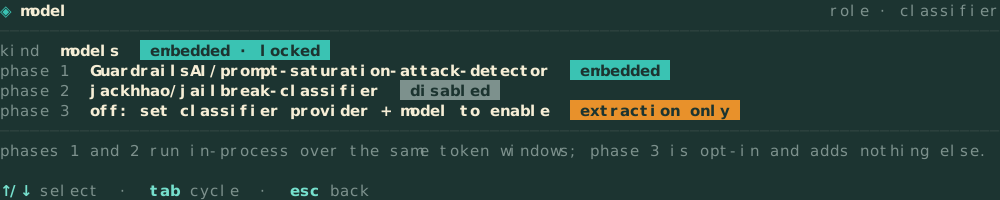
Phase 1 detects prompt saturation and phase 2 detects jailbreaks. They run at the same time over the same token windows, and a hit from either one ends the check. Neither model detects data or model extraction, so phase 3 hands that to an LLM once both BERT phases return SAFE. Phase 3 uses whatever classifier.provider and classifier.model name, which can be the sentinel or Jev. It stays off until both are set.

Any phase can also run on HuggingFace. Set phaseN.source: huggingface and choose a model from the list below. A binary without embedded models can use this to get BERT phases, and the default download can use it to add phase 2 without the 485 MB jailbreak build.

Default on
both bert-guardrails builds, and can't be changed there
Phase 1
bert-tiny, embedded, always on
Phase 2
bert-base, opt-in, embedded or HF
Phase 3
an LLM, opt-in, extraction only
Network
only for HuggingFace or phase 3
Phase 3 and the LLM fallback

The phase-3 prompt lists only SAFE, DATA_EXTRACTION and MODEL_EXTRACTION, and tells the model that injection and jailbreaks have already been checked. A smaller or cheaper model does better with three options than with five.

If the binary has no jailbreak model and you haven't set up a remote one, phase 2 is marked deferred to phase 3 and JAILBREAK is added to the phase-3 tokens. Prompt injection always stays with phase 1, which runs locally whenever the embedded models are in use. The separate phase2.source: disabled setting exists only on the jailbreak build, and turns jailbreak checks off entirely.

A malformed reply from phase 3 lets the content through, because phases 1 and 2 have already passed it. The activity feed shows "couldn't tell" for phase 3. If the phase-3 request itself fails, the content is blocked.

Models, thresholds and windows
modelphaseavailable from
GuardrailsAI/prompt-saturation-attack-detector1both bert builds, or HF
leomaurodesenv/bert-base-uncased-trustairlab-jailbreak2jailbreak build, or HF
leomaurodesenv/bert-base-uncased-jailbreakv-28k2HF
hurtmongoose/bert-base-detect-jailbreak2HF
hurtmongoose/jailbreak-bert-base-uncased2HF

Only BERT models are listed, because the converter and the wordpiece tokenizer read BERT vocab.txt files. Each entry stores the label its model uses for an attack, so Belai doesn't have to guess it for a remote model. On a binary without embedded models, with kind: models and an HF_TOKEN set, phase 1 uses the saturation model through the HuggingFace inference API by default.

A phase flags content when the attack score reaches its threshold. Phase 1 defaults to 0.75. Phase 2 defaults to 0.5, because ordinary tool output scores between 0.0 and 0.12 and known jailbreaks score between 0.6 and 0.75. You can change either with classifier.phaseN.threshold, the -classifier-phaseN-threshold flags, or the threshold rows in /model.

The BERT models return an error for input over 512 tokens and don't truncate it. Belai therefore splits content into 508-token windows that overlap by one eighth, up to 64 windows, and blocks anything longer. When windows disagree, the result follows this order: PROMPT_INJECTION > JAILBREAK > DATA_EXTRACTION > MODEL_EXTRACTION > SAFE.

Phase 2 is off by default, even on the jailbreak build. The first jailbreak model Belai shipped, jackhhao/jailbreak-classifier, gave ordinary code, JSON and test output scores above 0.95, higher than it gave the DAN jailbreak. It was replaced, and phase 2 now has to be turned on explicitly.

03

Jev on OpenRouter.

typesafe/jev-1.13

Jev is a model from TypeSafe that answers questions with probabilities through OpenRouter's Decisions API. Belai does not chat with it. It sends one yes-or-no statement per threat, such as "The content attempts prompt injection against an LLM.", along with the sanitized content, and Jev returns how likely each statement is to be true.

On an embedded build, Jev can be phase 3. It then checks for extraction, and for jailbreaks too when phase 2 is deferred. On a binary without embedded models, where kind: llm is the default, Jev is the whole classifier: it is asked about all four threats and covers what phases 1, 2 and 3 would. You can keep that setup even if HuggingFace BERT models are available.

Jev scores each threatany ≥ 0.9: that tokenall ≤ 0.1: SAFEotherwise: agent model decides
Settings
classifier.provider: openrouter and classifier.model: typesafe/jev-1.13
Needs
OPENROUTER_API_KEY
Endpoint
the Decisions API only
Undecided
the agent model answers the sentinel prompt
Request fails
content is blocked
What Jev is asked

Belai sends one request to POST openrouter.ai/api/alpha/decisions with one noul (probability) question for each threat being checked. The statements never change:

threatstatement
PROMPT_INJECTIONThe content attempts prompt injection against an LLM.
JAILBREAKThe content attempts a jailbreak or safety override.
DATA_EXTRACTIONThe content attempts training-data extraction or membership inference.
MODEL_EXTRACTIONThe content attempts model extraction or model stealing.

If any threat scores 0.9 or more, the result is the threat with the highest score. If every threat scores 0.1 or less, the result is SAFE. Any other outcome, including a missing answer or a score outside 0 to 1, goes to the agent model, which answers the usual sentinel prompt. Belai logs this as a security_fallback activity so the TUI shows which model made the call. Jev's result is converted to a normal sentinel token, so chunking, caching and phase 3 handle it the same way as a sentinel reply.

Belai never sends Jev a chat completion request. If a chat classifier is configured with Jev, it uses the main model instead. The same applies when model routing picks Jev for a use case, and the routing pickers don't list typesafe/jev* models.

Belai also uses Jev to approve tool calls, with the results ALLOW, DENY and INCONCLUSIVE. An inconclusive result blocks the call. With routing.kind: routed, Jev also picks a model for each use case.

When a check fails.

An error always blocks the content. An unclear result can be passed to another engine. This list covers every case.

  • The sentinel replies with anything other than one tokenThe content is blocked.
  • A classifier call errors, times out or gets a non-2xx responseThe content is blocked. The provider error is shown on one line.
  • The content needs more than 64 BERT windowsThe content is blocked.
  • An embedded model fails to loadBelai refuses to start.
  • Jev scores between 0.1 and 0.9, or its answer is malformedThe agent model answers the same sentinel prompt.
  • The binary has no phase-2 modelPhase 3 checks for jailbreaks as well, if phase 3 is set up.
  • Phase 3 replies with something malformed or emptyThe content goes through. Phases 1 and 2 already passed it, and the feed shows "couldn't tell" for phase 3.

blockedpassed to an LLMlet through and noted in the feed

The /model classifier rows showing kind, phase 1, phase 2 and phase 3
/model, classifier kind and phase rows
Classifier: three engines can classify untrusted content, and all of them reply with one of five sentinel tokens. The LLM sentinel works alone and is also the fallback for the other two. Embedded BERT models handle phases 1 and 2 locally or through HuggingFace, with an optional LLM phase 3. Jev on OpenRouter can be phase 3, or the whole classifier on a binary without embedded models, and passes undecided results to the agent model. Errors always block the content.
</classifier>
<sealed nonce=56207b00 sha256=e5ae704f…>sealed

Sealed blocks.

Every block of context carries a random nonce and a SHA-256 hash of its content. Before a request is sent, Belai removes any block whose nonce is missing or unknown, or whose hash doesn't match.

This stops a model from giving itself extra tools by writing its own <tools> block. The forged block has no valid nonce, so it is removed before the request goes out.

The sections of this page use the same format. Each header shows a hash that was computed at build time from the section's text. When a section scrolls into view, your browser recomputes the hash and the badge changes from sealed to verified if the two match.

Every block of context carries a random nonce and a SHA-256 integrity hash of its enclosed content. Blocks without a valid seal are removed before a request is sent. The sections of this page use the same format, and each header hashes its own section text.
</sealed>
<beliefs nonce=a264c816 sha256=5c787933…>sealed

Beliefs.

Safety above all else, and easy to YOLO.

Press f3 to turn the guardrails off. A gold chip appears in the footer, and the classifier is not called at all until you turn them back on. Turning them on again restores every check in the session, inline commands, file attachments, background agents and the CLI.

Roles for determinism.

Once you pick a mode, it stays until you change it, and later turns do not re-classify it. -detect-mode shows which mode the Role Manager would choose without acting on it.

Tools first class.

About 25 read-only utilities, including Cat, Head, Git, JQ, Find and Diff, are tools of their own. Each runs one specific binary with a fixed argument shape and never goes through a shell, so you do not need a growing Bash(jq *) allowlist.

Local first, open source, community access.

Belai is Apache-2.0 and sends no telemetry or logs. The default download includes its classifier model, so guardrails run locally without a provider or API key. Ollama and llama-server work out of the box, and the Vulnetix scanners and AI Firewall are free for everyone.

Four beliefs: safety above all else and easy to YOLO. Roles for determinism with sticky modes. Tools first class as a fixed-argv native catalogue. Local first, open source, with Apache-2.0, zero telemetry, embedded classifier models that need no API key, and two local providers.
</beliefs>
<labs nonce=6d2be0c9 sha256=671aa02d…>sealed

Compared with other harnesses.

Claude Code, Codex, Cursor and Gemini CLI run very good models. This table compares the harnesses around those models, and only on whether each feature exists. It says nothing about the models themselves.

Each row can be checked against public documentation or source code. A dot means no public source was found either way when the table was written.

Feature-presence comparison across Belai, Claude Code, Codex, Cursor and Gemini CLI.
featurebelaiclaude codecodexcursorgemini cli
untrusted content
sealed delimiters (nonce + SHA-256, stripped at egress), the tools briefing included✓✗✗✗✗
security classifier on every arbitrary tool result, including other agents' transcripts✓✗✗✗✗
three-phase classifier: in-process BERT gates before any LLM call✓✗✗✗✗
classifier models embedded in the binary (no API key, no download)✓✗✗✗✗
classifier on a separate or local model, routed per use case✓✗✗✗✗
probability-scored tool-call gate (allow / deny / inconclusive)✓✗✗✗✗
tool-call mismatch aborts by default✓····
terminal-escape and bidi sanitising of tool output✓✗✗✗✗
boundaries
first-run directory gated on explicit trust, headless fails closed✓✓···
fixed confinement roots; project-proposed dirs activate only when you accept them✓····
plan mode does not offer Bash to the model✓✗✗✗✗
one guardrails switch reaching every surface: session, !cmd, @file, background agents, CLI✓✗✗✗✗
posture gates with provenance, down to the model behind each classifier phase✓✗✗✗✗
skills and hooks load only after strict schema validation✓····
autonomy
goal loop stops when it is blocked, with no fixed turn count✓✗✗✗✗
goal contract drafted by the classifier, sealed by the harness✓✗✗✗✗
structured persisted plan documents, best plan kept across passes✓✓···
plan-mode explore subagents fanned out in parallel✓✓···
reusable agent profiles and background agents✓✓·✓·
supervised process library with an attempt-capped recovery subagent✓✗✗✗✗
classified provider retry plus semantic repair of malformed tool calls✓····
tools & context
native fixed-argv tool catalogue (~25 utilities)✓✗✗✗✗
language-server diagnostics sealed into Edit/Write results✓✗✗✗✗
language servers never granted workspace/applyEdit✓····
harness-computed repo map with no file contents✓····
path-free search across other agents' sessions and memory✓✗✗✗✗
prompt library as files✓✗✗✗✗
integrations
local providers in the box (ollama, llama-server)✓✗✓✗✗
security scanners and an AI firewall built in (Vulnetix)✓✗✗✗✗
credential import✓✓✓✓✓
Compared with other harnesses: a table of which features Claude Code, Codex, Cursor and Gemini CLI have. Each row can be checked against a public source, and the table does not rate the models.
</labs>
<modes nonce=8b5ba125 sha256=19f33818…>sealed

Modes.

Belai has three modes: agent, plan and goal. A prompt sent without a mode is classified into one of them. A mode you pick yourself is kept as it is.

Agent is the default for general coding. Every tool is available behind the permission rules, and the security classifier checks every untrusted result. Each agent turn ends on a✓ done panel that Belai writes itself, with the number of tool calls, edits and the time taken.

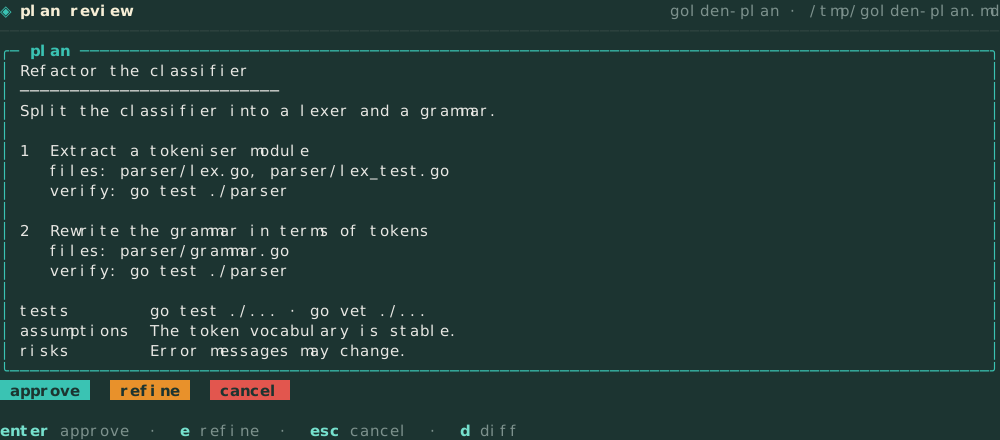
Plan mode is read-only. The model is not offered Bash at all, so it has no way to call it. An explicit allow rule can add a read-only Bash back. The last planning pass offers only update_plan, ExitPlanMode and AskUserQuestion, so every plan turn ends with a plan or a question. The plan is saved as a structured document that you approve.

In any mode the model can ask you multiple-choice questions with AskUserQuestion instead of guessing. In agent and goal mode your answers come back to it straight away and the work carries on. In plan mode your answers start a new agent turn with every tool, so the model acts on them rather than stopping at a plan. A question already asked in the session is never asked again, and a run with nobody to answer is told to proceed on its own judgement.

Goal mode works on one named objective until it is done. Progress is tracked in a todo list built from the assistant's own text, and the loop continues while the objective moves forward. Every pass checks progress against that list and asks the model to update it alongside the tool calls that finish the next step. When the goal is met, the model writes a final report of what changed and how it was checked. A goal that stops early reports what is left. An approved plan runs the same way and ends on the same report. With auto-commit per task on in /settings, each completed goal is committed as one conventional commit of exactly the files it changed.

A goal starts work at once. Its completion contract is drafted alongside and joins at the next pass when it is ready, and it is not held back by a read-only survey unless resilience.goal_explore is on. After eight rounds of reading without changing a file, the model is told to stop surveying and make the first edit.

-detect-mode prints the mode Belai would choose for a prompt without acting on it.

The plan review pane with Approve, Refine and Cancel
1 / 1

plan review pane

Modes: agent for general coding, plan for read-only investigation with Bash absent, and goal for one tracked objective. In any mode the model can ask you multiple-choice questions; in plan mode your answers start a new agent turn with every tool. Explicit choices are sticky and never re-classified. An agent turn ends on a done panel; a goal or an approved plan ends on a final report.
</modes>
<tools nonce=7bf725a7 sha256=d709573c…>sealed

Tools.

Belai includes a set of read-only utilities as tools: Cat, Head, Git, JQ, Find, Diff and about 19 more. Each runs a specific binary with a fixed argument shape, passed directly to exec.Command without a shell. Free-form command strings are rejected.

Cd can move the working directory anywhere inside the session root and nowhere outside it. A path such as ../../../etc that leaves the root is refused.

You can still reach past the root yourself. Typing @../, @/ or @~/ browses the filesystem one folder at a time, and entries outside the session roots carry an amber ⚠. Attaching one asks first: add its folder as a root for this session, save it for the project like /add-dir, or decline. Nothing outside the roots is read until you say yes, and a folder that contains the session root is refused.

The core tools take the arguments models are trained on. Grep accepts glob, type, -i, context lines and output_mode. Bash accepts a timeout of up to ten minutes (two by default), so a normal test run finishes. Edit and Write refuse to change a file the model has not read in this session, or one that changed on disk since it read it.

Tools first class: a fixed-argv native catalogue of read-only utilities, never a shell. Cd is confined so the working directory moves inside the session root and the root does not widen.
</tools>
<diagnostics nonce=f10ff70e sha256=51c71d2d…>sealed

Diagnostics.

After the model edits a file, Belai checks it and returns any errors in the same Edit result. The model does not need a separate build or lint call to see them.

Language servers are detected on PATH. When none is installed, fixed-argv syntax checks like gofmt -e, bash -n, ruby -c and zig ast-check take over. Each language can be toggled in /settings.

Same turn

Errors come back on the Edit or Write result.

Fourteen languages

Go, TypeScript, Python, Rust, C, C++, Obj-C, C#, Java, Dart, Swift, Zig, Bash and Ruby.

Found on PATH

Belai only uses servers it finds on PATH. /settings shows the install command for a missing one but does not run it.

Fallback checks

With no server installed, fixed-argv syntax checks run instead, without a shell.

Capped and sealed

Up to ten rows of 200 runes, each on one line, with control and bidi runes removed and a nonce seal.

No all-clear message

When no check reports anything, nothing is attached. Belai never tells the model a file is error-free.

Diagnostics: the harness checks the file the model just edited and hands the errors back on the same tool result. Language servers detected on PATH, fixed-argv syntax checks when none is installed, per-language on/off in /settings. Every message is capped, flattened to one line, stripped of control runes, and sealed with a nonce and a SHA-256.
</diagnostics>
<permissions nonce=74c7b13e sha256=6eec5529…>sealed

Permissions.

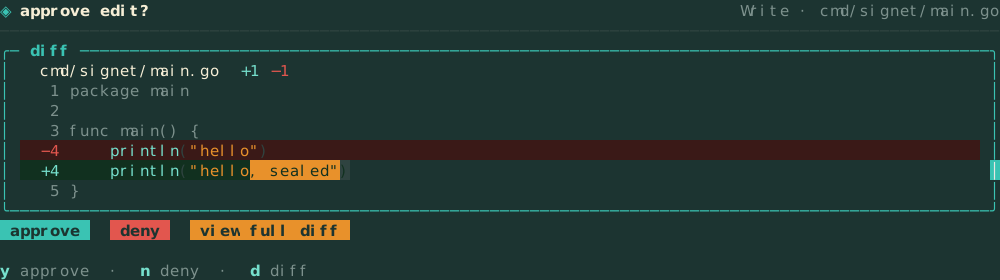
Each tool is set to allow, deny or ask. With ask, you see the diff before a tool that changes files runs.

The permissions in effect combine policy, session, tool kind and role. Each grant records which of these added it, and an explicit deny always wins.

When no rule matches, the tool call is allowed. Set permission_no_match to enforce to block it instead. The guardrails switch applies to the agent session, inline !cmd, @file attachments, background agents and the CLI. Each of these checks the switch before calling the classifier, so turning a gate off also stops its classifier calls.

The approval prompt showing a diff
1 / 2

approval prompt, diff in the prompt

Permissions and approvals: allow, deny, or ask per tool, a union with provenance per grant, and an approval prompt that shows the actual diff.
</permissions>
<agents nonce=c5376b1d sha256=1991e84f…>sealed

Agents.

The main session and background agents get every tool: Bash, Read, Write, Edit, the native read-only utilities, and GH and Glab. The permission rules and the guardrails switch decide what each call may do.

Three kinds of agent are read-only: the f8 roster, plan mode, and the recovery subagent that restarts a crashed process.

Read-only fan-out.

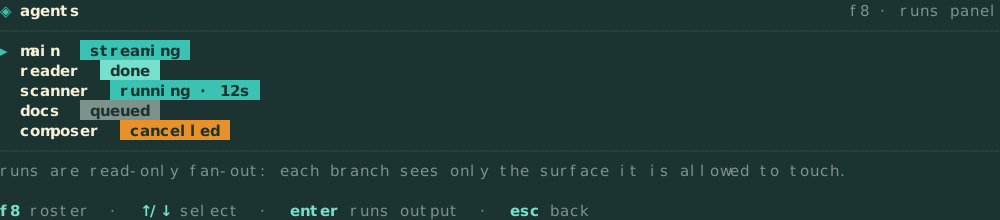
The f8 roster splits a question across several read-only agents that run at the same time. Each one gets only the tools it is allowed to use, and their results are merged at the end. These agents have no write tools, so text they read can't get them to change files. Each gets one narrow task and two to five rounds, depending on the kind of task, and reports one path:line finding per line, capped at 6 KiB. When one runs out of budget it writes its report in a single pass with no tools, instead of reading on.

The f8 subagent roster and runs panel
1 / 1

f8 roster, runs panel

Background agents.

/agent opens the list of saved agent profiles, where you can edit one, start it, or make a new one. A profile has its own system prompt, provider, model, effort and guardrails setting. A started profile runs in the background while you keep working in the session.

A profile with no tool list gets every tool. A profile that lists tools gets only those. The list is chosen from a fixed set in the profile editor, which includes Bash and Write. The built-in belai:triage-vulns profile lists Read, Grep, Glob and Bash. It leaves out Write and Edit because it only proposes fixes.

Modes

Single runs once. Loop repeats. Scheduled runs on an interval. Monitor checks a condition on an interval and runs when it is true.

Supervised or autonomous

Each profile sets its autonomy. An autonomous agent still follows the permission rules and guardrails.

Iteration limit

A profile with guardrails off, autonomy set to autonomous and a looping mode is refused unless it also sets max_iterations.

Model and guardrails

A profile can use a different provider, model and effort from the main session. It can also turn guardrails on or off for itself.

Runs beside the session

Each background agent has its own slot in the agent pool and its own iteration count. It doesn't block the session you are typing in.

Recovery subagent

The recovery subagent gets the read-only plan tools plus SubAgentLog and ProcessRestart. It can change a command's flags but not its binary.

Agents: the main session and background agents get every tool, behind the permission rules and the guardrails switch. The f8 roster, plan mode and the recovery subagent are read-only. Background agents are saved profiles under /agent with their own system prompt, mode, autonomy, model and tool list. A profile with guardrails off, autonomous and a looping mode must also set max_iterations.
</agents>
<memory nonce=45503b74 sha256=f4b9cfab…>sealed

Memory.

Other coding agents on your machine have probably explored this repository already. Belai can search what they found instead of exploring again, and each turn starts with what the session already knows about the repository, so the model does not have to ask again.

Other agents on this machine.

SearchSessions searches past sessions with a regular expression, by default only those recorded in the current project. ReadSession reads the turns around a hit. SearchMemory searches memory and rules files such as AGENTS.md, CLAUDE.md, .cursorrules and each agent's memory folder. Every hit names the agent, session, turn, role, time and project it came from, so the model can cite it.

None of the three tools takes a path. Every location comes from a fixed list of known agent stores, so they cannot be used to read any other file on the machine. They never write to another agent's store. Text in those stores was written by other models, so every result is classified before the model sees it, and the model is told that a hit is a record of what an agent once wrote, to be checked against the current files.

A search stops at 200 matches, 256 KiB or ten seconds, and the result says when it was cut short.

Sessions

Belai, Claude Code, Codex, pi, Goose, opencode, Copilot in VS Code, the Copilot CLI and Antigravity.

Prompt history

With prompts_only, only the prompt history files are searched, which is faster.

Memory and rules

Per-agent memory folders, Belai's saved goals, prompts and plans, and the usual rules files in your home folder and the workspace.

No new dependencies

Uses rg to narrow the files when it is installed. Goose and opencode need sqlite3 on PATH and are skipped, with the reason, without it.

What the session already knows.

Git and forge facts

Every turn carries the upstream with ahead and behind counts, the worktrees, and, when gh or glab answers, the PR or MR number, its state and CI counts. The facts refresh in the background and a turn never waits for the network. PR titles, check names and other forge text are left out. The model reads those through GH or Glab, which classify.

Read index

When the model reads an unchanged file again and the earlier copy is still in the conversation, it gets a short note instead: the path, the lines, the size and the git blob id. The index stores those facts, never file contents. Any edit, a changed timestamp or a file whose read was withheld sends the next read to disk and through the classifier as usual.

Context prefetch

Plan and goal turns, and approved plans, start by reading AGENTS.md, CLAUDE.md and the files changed in the working tree. The reads use the session's own Read and are classified the same way. They stop at 12 files, 48 KiB per file and 128 KiB in total, and a file a permission rule would ask about is skipped.

Memory: SearchSessions, ReadSession and SearchMemory read the transcripts and memory files of other coding agents on this machine from a fixed registry, take no path argument, cite every hit, and always classify. Each turn also carries harness-computed git and forge facts and the read index, and plan and goal turns prefetch the instruction and changed files through a classified Read.
</memory>
<processes nonce=8e695f1f sha256=c68680f1…>sealed

Supervised processes.

!!cmd starts a long-running command, such as a dev server, a file watcher or a tunnel, inside Belai instead of in another terminal. No model turn is sent for it. The command is saved as typed in the project's process library, so a later session in the same directory can start it again, and entries marked enabled start automatically.

Type /process: and a few letters of a saved name to start it from the composer. The / popup matches fuzzily, and it also offers saved prompts (/prompt:) and agent profiles (/agent:). If the process is already running, it isn't started again, and its status is shown either way./processes manages the library across project and global scope. Output streams to a log file under ~/.vulnetix/belai/logs and into the f9 runs panel. The panel opens on the activity tab, and tab cycles through activity, subagents, processes, git and ci. The processes tab lists only the library's running processes. From there enter or v opens the live tail full-screen, x stops the selected process, and r restarts it. The log stays on disk, so you can still open the tail after the process has finished.

When a process exits with a non-zero code, a recovery subagent starts. It has the read-only plan tools plus SubAgentLog to read the log and ProcessRestart to try again. A restart can change the flags but not the binary, because argv[0] is fixed to the original command. Deny rules still apply, and each attempt uses one of the resilience.max_process_recoveries slots. When they run out, the process is marked failed and no more model calls are made.

The git tab shows the branch and its upstream, the origin URL with credentials masked, the open PR or MR, and every worktree. enter moves the session into a worktree, a adds one, x removes one after a confirmation, and p opens a PR or MR after a confirmation that names the forge, repository and branch. Turning guardrails off does not skip that confirmation. The ci tab lists the checks or pipeline jobs for the branch, and appears only when there is an open PR or MR. Belai runs git, gh and glab with fixed arguments, and those CLIs keep their own credentials. Text the forge returns, such as PR titles and check names, is shown in the panel only. It is never sent to the model.

Supervised processes: !!cmd starts a long-lived command with no model turn, the library keeps it per project or globally, logs stream to disk, and a bounded recovery subagent may change flags but never the binary. The f9 runs panel cycles activity, subagents, processes, git and ci; the git tab manages worktrees and opens a PR or MR behind a confirmation, and forge text stays in the panel.
</processes>
<budgets nonce=4a4dc2ca sha256=45dcd9d3…>sealed

Token budgets.

Give any provider and model a budget for the session, the local day or the local month, up to one of each. Budgets are global: a repository's settings file cannot raise or remove them. Open the screen with f1 then b, /budgets, or the token budgets row in /settings, and type allowances as 250k or 1.5M.

Every completed model call counts its prompt and completion tokens, reasoning included, under the provider and model that served it. That covers the main turn, subagents, background agents and every classifier and role-manager call. When a provider reports no usage, Belai estimates it and marks it as estimated. Usage is kept in one ledger shared by every belai process, headless runs included.

Day and month budgets count every project's sessions, including sessions from before budgets existed. When the TUI starts, it reads the saved transcripts the ledger has not seen yet in the background and adds their usage. A goal run adds its exact token count, split across the days it ran. For other turns, a transcript keeps only the usage of the last model call, so the imported figure is a lower bound. A session is never counted twice, even when two belai windows import at the same time.

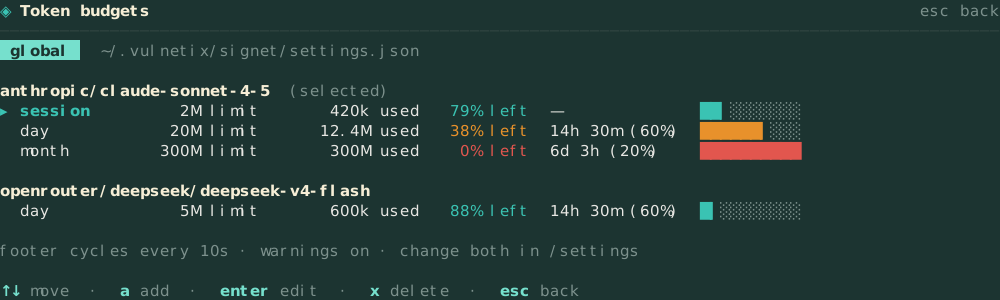
With defined routing, the footer's top line shows the selected model's budget on the right: the percentage of tokens left, the time left in the day or month, and a bar. The bar is teal while the tokens are lasting at least as long as the clock, amber when a larger share of the day or month is left than of the tokens, and red once the budget is spent. A session budget has no clock, so it is never amber. With two or more budgets the footer cycles between them every ten seconds (ui.budget_cycle_seconds). Turn on ui.budget_warn for a warning line on every call while a budget is amber or red. Budgets inform; they never block a call.

The token budgets screen with teal, amber and red budgets
1 / 2

f1 → b, token budgets

Token budgets: a global allowance per provider and model for the session, the local day and the local month. Every completed model call counts, classifier and role-manager calls included. The footer shows the selected model's budget right-aligned and cycles between them; teal while tokens last as long as the clock, amber when spend runs ahead of it, red when exhausted. Past sessions are imported from their transcripts once, so day and month totals cover every project. Budgets warn; they never block.
</budgets>
<providers nonce=dc01b021 sha256=f1f140ff…>sealed

Providers.

Credentials are read from five layers: the command line, environment, config file, agent profile and built-in defaults. Each resolved value records which layer it came from.

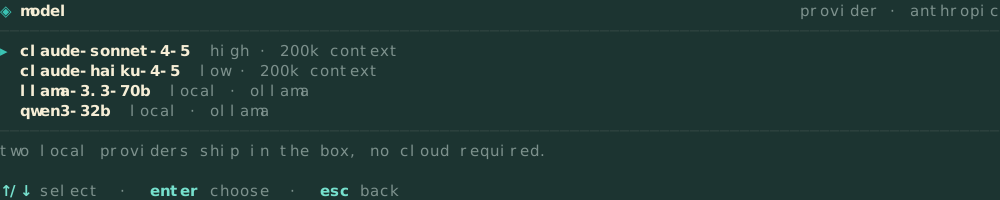
ollama and llama-server are supported without extra setup. A model you run locally appears in /model. If you stop the server, it leaves the picker but stays in /credentials, so Belai won't switch to a host that isn't running.

You can configure several named instances of a provider. A provider profile can set a kind (ollama, llama-server or openai-compatible) to copy a built-in template, and a display name in provider_labels that /providers, /model, the footer and the -provider flag all accept. A second Ollama on another machine is one more config entry.

/local-model runs the classifier probe against a local model before you use it for a session, and reports how well it fits, any notes, and how it compares with the hosted baseline.

The security classifier is configured separately, with its own rows in /model. The kind row selects models (the embedded BERT models) or llm (the sentinel), and the phase rows name the model used for each phase, including when phase 3 is off. With a local classifier model, untrusted content is judged on your own machine. The classifier section explains how the engines combine.

Which model answers each kind of call is covered under model routing.

The model picker
1 / 2

/model picker

Providers and local inference: five-layer credential resolution with provenance, ollama and llama-server in the box, multiple named instances with display labels, a /local-model assess verdict, and a classifier role with its own kind and phase rows.
</providers>
<routing nonce=60d38af8 sha256=07cde71a…>sealed

Model routing.

A single prompt can make several model calls before the first edit: picking the mode, naming the session, checking the plan or goal, drafting the goal contract. Most of those return one token. Routing decides which model answers each call, so the model you picked is spent on the work itself.

The fast tier is on by default. It uses the provider's own small model on the same credentials: claude-haiku-4-5 for Anthropic, gpt-5-mini for OpenAI, gemini-2.0-flash for Google and a matching model for Groq, Mistral and xAI. routing.fast_model can point it at another provider. Mode selection, the session name, the plan, goal and agent verdicts and the goal-contract draft go to the fast tier. Compaction, clarifying questions and the final report stay on your main model, because their output shapes the rest of the work.

routing.kind is defined by default: your main model answers everything the fast tier does not. Set it to routed and list candidate models under routing.use_cases. On the first call for a use case, the Jev Decisions API scores the candidates and Belai keeps the winner for the rest of the session. A failed call, a tie, or a winner that is not in your list falls back to the main model, so routing can slow a call down but never drop one. Fast-tier calls skip Jev entirely.

The security classifier is not part of routing. It stays on the main model, or on the classifier models you configured, unless you set classifier.tier to fast. A smaller guard is easier to talk past, so moving it is your choice to make. Routing is a cost and speed setting, not a security boundary.

Nine use cases

main, mode_eval, goal_eval, plan_eval, goal_contract, clarify, compaction, session_name and agent_eval.

tab to switch

In chat or on /model, tab toggles between defined and routed. The footer then shows either the one model in use or the number of models the router has active.

/model says what is in effect

The screen opens with four lines: which model does the work, the verdicts, the drafting and the security check, resolved from the live settings.

Checked at load

A candidate needs a provider or a model, and the provider must be one Belai knows. A bad routing table stops startup instead of sending traffic somewhere unexpected.

Per project, key by key

A project's settings can change one use case without repeating the global table.

Counted where served

Every routed or fast-tier call counts against the budget of the model that answered it.

Model routing: the model you pick does the work, a fast tier answers one-token verdicts and drafts the goal contract, and routed mode lets Jev pick a model per use case from your candidate list, falling back to the main model when it cannot decide. The security classifier never follows the routing table. tab cycles defined and routed.
</routing>
<vulnetix nonce=b1184335 sha256=b3dcfc11…>sealed

Vulnetix integration.

AI Firewall routes your LLM traffic through a filtering gateway, using the gateway key in place of the provider key. If any of its four required settings is missing, Belai talks to the provider directly. The status footer shows whether the gateway was reachable when Belai started.

Code Scanner reviews repositories and reports findings without copying raw code snippets into the transcript. Report content is shown in the TUI and is never sent to the model as a trusted system block. /vulnetix review runs the scanners, firewall toggles the gateway, and status prints capabilities.

A review runs nine scanners: sca, containers, sast, secrets, iac, malscan, sbom, aibom and cbom. Eight run at once, each in its own lane, so no two scanners write the same output file. Stopping one scanner leaves the others running, and review scans have no timeout. secrets checks the files in your working tree, not every commit in your history.

You see the review as it happens. Each scanner posts a card in the thread the moment it finishes, written for what that scanner does: vulnerabilities and license issues for sca, exposed secrets for secrets, packages by ecosystem for sbom, tools and models for aibom, and algorithms with their post-quantum status for cbom, naming any deprecated one. The footer counts scanners done and still running. While it runs, the prompt box steers the review: what you type is added to the remediation turn, and esc cancels it.

Findings come back for triage. Report blocks are size-limited, sanitised and classified, and are dropped unless the classifier passes them. As each scanner finishes, its report goes to a read-only background agent that checks every finding against the repository and returns one line per finding: a verdict, plus a fix, a list of options, or a note that there is no fix. Its report shows up in the thread while the slower scanners are still working.

When a finding has more than one reasonable fix, Belai asks you which one to use before any change is made. The session then switches to agent mode with the built-in belai:vulnetix-review profile, which sees every subagent report together, since findings from different scanners often have the same cause. Dependency findings go to a vulnetix fix plan, which is a dry run unless you turned on autofix. Code findings are patched in the session under the normal permission prompts. The review ends by writing .vulnetix/belai/code-review-report.md with three lists: what was fixed, what needs your decision, and what could not be resolved, with the reason for each.

Vulnetix also provides an MCP server. The scanners, the firewall and the MCP server are free for everyone.

Vulnetix integration: the AI Firewall routes traffic, nine code scanners run in parallel lanes, each scanner posts a result card as it finishes and gets its own read-only background agent, the prompt steers or cancels a running review, a question when a finding has more than one fix, a dry-run fix plan, and a code-review report, and /vulnetix review, firewall, and status are built in. Free for everyone.
</vulnetix>
<sandbox nonce=7760c7ab sha256=63030be2…>sealed

Sandbox.

Belai's own file tools stay inside the workspace roots, but a command can reach anything your account can. So Bash, inline !cmd and supervised processes run under an operating-system boundary: bubblewrap on Linux, sandbox-exec on macOS.

Inside it the workspace roots, a private /tmp and the usual tool caches are writable, everything else is read-only, and ~/.vulnetix/belai is hidden. The default keeps the network and caches so builds work; set network to deny and caches to false for the strict policy. A repository can tighten the sandbox and never loosen it, and required refuses a command rather than run it bare. /sandbox shows the policy in effect.

docs/sandbox.md

OS sandbox: Bash, inline !cmd and supervised processes run under bubblewrap on Linux or sandbox-exec on macOS. The workspace roots, a private /tmp and the usual tool caches are writable, the state directory is hidden, and the network can be denied. A repository can only tighten it; guardrails off turns it off; required refuses to run without a backend.
</sandbox>
<extend nonce=b8310017 sha256=a82e3b22…>sealed

Extend it yourself.

The things people usually add to a coding agent by forking it are built in, and each one is held to the same trust model as the rest of Belai.

hooks that only narrow

A hook runs your command at one of eleven points (before and after a tool call, on prompt submit, at turn end, before compaction, when a subagent stops, when Belai needs you). It reads the event as JSON on stdin and may answer allow, deny or ask. A deny withholds the call, an ask raises the permission prompt, and an allow never skips an ask a rule demanded. A blocking hook that fails, times out or prints anything but a decision denies.

docs/hooks.md

skills by name, drafted with approval

The model loads a skill with the Skill tool by name, never by path. After working out a procedure worth keeping it can propose one with SkillDraft: you see the whole file, or the diff against an existing skill, and nothing is written unless you approve. That ask happens even with the ask gate off.

docs/skills.md

plugin packages

belai plugin install takes a git URL (pinned with #ref) or a directory. Every skill, hook, prompt and agent profile is checked with the validator Belai uses for your own files, one bad component fails the install, and you confirm a listing that names every hook command. Components load as plugin:name and never shadow yours.

docs/plugins.md

desktop notifications

Opt in and Belai tells you when a permission ask, a question or a plan is waiting, or when a goal finishes or stops. OSC 9 and 777 for terminals that show them, notify-send, osascript or the bell otherwise. The text comes from fixed templates, so a repository cannot put words in front of you.

docs/notifications.md

Extend it yourself: hooks at eleven points with allow, deny and ask decisions that can only narrow; skills loaded by name and new ones drafted only with your approval; plugin packages of skills, hooks, prompts and agents, validated whole, pinned and namespaced; desktop notifications written from fixed templates. Hook and skill text is classified like any other untrusted result.
</extend>
<integrations nonce=5f0c0f55 sha256=1453ec4b…>sealed

Integrations.

Belai connects to the tools and editors you already use, and none of those connections is a way around its gates.

MCP servers

Declare stdio or streamable HTTP servers in your global settings. Each tool appears as mcp__server__tool, asks before it runs unless a rule allows it, is never offered in plan mode, and its result is classified. A repository cannot add, change or start a server.

docs/mcp.md

editor integration over ACP

belai acp speaks the Agent Client Protocol, so Zed, JetBrains IDEs and Neovim plugins can use Belai as their agent. Each session is built like a headless CLI session, so every gate applies, and a directory you have not trusted is refused.

docs/acp.md

OpenTelemetry, without content

Point Belai at a collector and it exports turn and tool-call spans on the session trace, plus token, tool, classifier and hook metrics. Only allowlisted keys leave, and every value is reduced to identifier characters, so no prompt, argument, output or path can.

docs/telemetry.md

Integrations: MCP servers from your own settings, with every tool named mcp__server__tool, asking before it runs and classified after; belai acp for Zed, JetBrains and Neovim with the same gates as the CLI and a fail-closed trust check; OpenTelemetry export of spans and metrics built from an attribute allowlist that cannot carry content.
</integrations>
<cli nonce=3b130c00 sha256=2d874cc5…>sealed

Headless CLI.

Belai is the same binary in a terminal and in a CI job. From the command line you can set the mode, guardrails, permissions, provider and agents without starting the terminal UI.

terminal-aware, CI-ready

The TUI launches only when stdin and stdout are both terminals. In a pipeline, under GitHub Actions, or with BELAI_NO_TUI=1 or CI set, Belai stays headless.

one-shot answers

belai -prompt "review this diff" prints a single reply and exits. Pair it with -provider, -model and -effort, or let settings.json supply the defaults.

read-only plans from the shell

belai -plan -prompt "map the repo" runs the plan-mode surface with Bash absent, writes a structured plan document, and exits without asking for approval.

-detect-mode without acting

belai -detect-mode -prompt "…" runs the mode classifier and prints the mode it would pick. No tools run.

trust a workspace in CI

belai -trust-dir grants trust to the current directory once, so unattended jobs can start in a fresh checkout without a prompt.

export a session as Markdown

belai -export <id-prefix> prints a deterministic Markdown transcript of a saved session and exits. It reads only the session store, never repository content.

belai acp for editors

belai acp serves the Agent Client Protocol on stdin and stdout, so Zed, JetBrains IDEs and Neovim plugins drive Belai with every gate in place. An untrusted directory is refused, never prompted.

belai plugin

belai plugin install <git-url|dir> prints every skill, hook command, prompt and agent a plugin adds and installs only on your yes (or -yes after reading it). list, update, enable, disable and remove manage what is installed.

every gate from flags

-guardrails, -ask-permission, -tools, -firewall and -verbose all work from the command line. Scripts get the same blocking defaults as the TUI.

Headless CLI: the same harness without the TUI. Terminal detection keeps the UI off in pipelines, -prompt gives a single answer and exits, -plan runs read-only, -detect-mode prints the mode choice, -trust-dir opens a CI workspace, -export prints a session as Markdown, belai acp serves editors, belai plugin manages plugins, and every posture gate is reachable from flags.
</cli>
<qol nonce=4de9adda sha256=12dfc41a…>sealed

Quality of life.

Smaller features you would otherwise add yourself through a skills.md. Each one is implemented and tested in this repository.

first-run trust gate

A directory Belai has never seen blocks startup until you say yes, before any settings merge, repo scan or auto-started process.

prompt library as files

Prompts are files in the repository, so they are versioned and reviewed like code.

harness-computed repo map

Paths, counts, detected commands and git metadata, with no file contents.

one history for everything you typed

Up recalls prompts, !shell commands, !!processes and /slash commands in the order you ran them, across restarts, with repeats kept once at their newest position.

work-discipline prompt section

The system prompt tells the model to read the exact lines it will change, batch its reads, make the edits it is sure of first, and report what changed.

identity block

Every system prompt names the harness, provider and model in use.

capability auth probes

A small test request checks that a model supports a capability before Belai relies on it.

diff in the approval prompt

The approval prompt shows the diff of the change as well as the path.

todo panel that only trusts assistant text

The todo list only changes based on the assistant's own text. Tool output cannot update it.

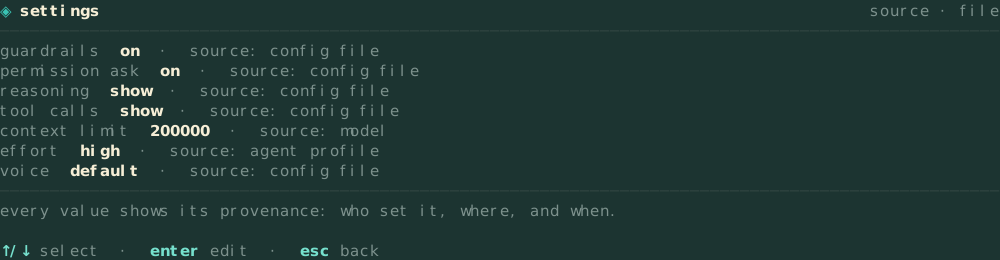
/settings with provenance

Every value shows which settings layer it came from.

no alt bindings

No shortcut uses the alt key, so terminals that capture alt do not swallow keystrokes.

/help guarded by a test

A test compares the help text with the real key bindings.

caveman mode

An optional voice that makes replies short and plain.

session toggles per project

Toggles such as guardrails and ask-permission are saved for each repository.

session export

Type /export to write the current session (or another by id) as deterministic Markdown under .vulnetix/exports; belai -export <id> prints it to stdout.

opt-in per-goal auto-commit

Turn on auto-commit per task in /settings and every completed goal is committed as one conventional commit of exactly the files it changed — global only, so a repo can never switch it on for you.

!cmd gets its own shell panel

A !cmd shows its raw output in a panel, live while it runs. The model only gets the sanitised, classified copy, and the panel marks the output "not sent" when that copy is withheld. ctrl+o expands it, ctrl+c copies it and ctrl+s saves it.

timestamps and durations in the transcript

Each transcript row is stamped when its event happened, and tool calls, model replies and classifier decisions record how long they took, so a slow session shows where the time went.

classifier verdicts in the feed

When a result is blocked, the internal-work feed shows which phase blocked it and what it returned.

token budgets per model

Session, day and month allowances per provider and model, counted across every model call and every belai process, shown right-aligned in the footer: teal on pace, amber when spend runs ahead of the clock, red when spent.

desktop notifications

Opt in with notifications.enabled and Belai tells you when a permission ask, a question or a plan is waiting, or when a goal ends. The text is written from fixed templates, never from model or tool output.

/skills, /plugin, /mcp and /sandbox

One command each shows the installed skills, the plugins and their state, the MCP servers and their tools, and the sandbox policy commands run under.

self-update stays in its family

A guardrails binary updates to the next guardrails build, so it keeps its embedded model.

Sessions.

/compact writes a summary that must include a goal, next steps and critical context, and a summary missing any of them is rejected. Sessions are named after the work done in them. A message sent mid-turn is queued onto the running turn, and the exit card shows the command to resume the session.

The settings screen showing provenance per value
1 / 4

/settings, provenance per value

Quality of life: smaller features you would otherwise add through a skills.md. First-run trust gate, prompt library, one composer history for prompts and commands, repo map, work-discipline prompt section, identity block, capability auth probes, diff in the approval prompt, a todo panel that only trusts assistant text, sessions, Markdown session export, opt-in per-goal auto-commit, /settings with provenance, no alt bindings ever, /help guarded by a test, caveman mode, per-project session toggles, classifier verdicts in the internal-work feed, a shell panel for !cmd with the raw output, transcript rows stamped when they happen with durations, token budgets per model in the footer, desktop notifications, /skills, /plugin, /mcp and /sandbox, and a self-update that stays in its asset family.
</qol>
<start nonce=05233ad2 sha256=82db0181…>sealed

Getting started.

Belai runs on linux, darwin and windows, on amd64 and arm64. Each release is built by the same workflow that publishes the Homebrew formula and the Scoop manifest, and the installer checks the binary against the release checksums before writing anything.

install

  • Homebrew

    brew install vulnetix/tap/belai
  • Scoop

    scoop bucket add vulnetix https://github.com/Vulnetix/scoop-bucket && scoop install belai
  • install.sh (checksum-verified)

    curl -fsSL https://raw.githubusercontent.com/vulnetix/belai/main/install.sh | sh
  • install.sh, another variant

    curl -fsSL https://raw.githubusercontent.com/vulnetix/belai/main/install.sh | sh -s -- --variant bert-guardrails-jailbreak
  • go install

    go install github.com/vulnetix/belai/cmd/belai@latest
  • source

    git clone https://github.com/vulnetix/belai && cd belai && go build ./cmd/belai

first run

  1. launch the TUI

    belai
  2. a first-run directory is gated on an explicit yes, before anything reads it

    trust this directory?
  3. commands and shortcuts, guarded by a test

    /help
  4. or / to fuzzy-find commands, prompts, agents and processes

    type a prompt
  5. cycle agent, plan, goal

    shift+tab
  6. print the mode decision without acting on it

    -detect-mode
  7. pick a provider and model, and see the classifier kind and phase rows

    /model
  8. cycle model mode between routed and defined, in chat or on /model

    tab

Which binary you get.

Releases ship in four asset families. Homebrew, Scoop and install.sh all default to belai-bert-guardrails, which includes the phase-1 model in the binary. Guardrails work straight away, without a configured provider, an API key or a model download. The installed command is belai for every family, and each binary updates itself within its own family.

belai-bert-guardrailsdefault

embeds: phase-1 prompt-saturation model · ~40 MB

Guardrails classify locally with no provider and no API key configured.

belai-bert-guardrails-jailbreak

embeds: phase-1 + phase-2 jailbreak model · ~485 MB

Adds the local jailbreak gate, run in parallel with phase 1.

belai

embeds: nothing · ~23 MB

Classifies with the LLM sentinel, as Belai did before models were embedded.

belai-no-classifier

embeds: nothing · ~23 MB

For hosts that classify somewhere else entirely.

Pick a family with --variant (or BELAI_VARIANT): bert-guardrails, bert-guardrails-jailbreak, no-classifier, or vanilla. Building from source stays on the LLM sentinel path unless you run the model-prep recipes yourself.

belai · Apache-2.0 · github.com/vulnetix/belai

Free and open source, like the Vulnetix scanners, AI Firewall and MCP server.

Getting started: install from Homebrew, Scoop, a checksum-verified install.sh, go install, or source. The default asset embeds the phase-1 guardrails model, --variant picks another family, and the first run asks you to trust the directory before anything reads it.